


Home | AI SEO Marketing | Pro Templates
👋 Subscribe free (it helps me produce research like this) for proven tips + tactics on how to win more visibility in Google and AI search. Get SEO/AI strategies, new data, and frameworks delivered each week. Premium subscribers get full access.
It's a great irony that while AI answers can reduce clicks to our websites, AI output often relies on user-click data to produce more accurate results.
That’s what I learned after diving deep into user click signals from Google’s API leak, antitrust trial, and patent filings.
If algorithms like “RankEmbedBERT” sound boring, it was digging into how Google defines goodClicks and lastLongClicks that really deserve attention. These are seemingly fundamental to Google’s ranking algorithms, and, more importantly, marketers can influence these signals in the right direction.
During the recent US antitrust trial, it was argued that user data—what people click on and interact with—made up the majority of “Google’s scale advantage“ and that simply sharing these user interactions would allow competitors to “mimic Google’s ranking.”
In fact, Google records almost every action we take: what we search for, what we click, and how long we spend on a website.
We are all a giant Mechanical Turk, telling Google which results are good.
Importantly, it turns out these signals also play a big part in AI answers and in any AI output that relies heavily on Google (looking at you, ChatGPT).
So exactly what click signals does Google measure? Can we influence them?
First, some caveats. What we know about Google’s use of click signals mostly comes from the U.S. v Google antitrust trial, Google patents, and Google’s big API leak. Importantly, simply because something is patented or has an API endpoint doesn’t mean we know 100% if and how Google uses it.
That said, as these exact concepts are referenced across all three sources, including trial testimony, it’s a fairly strong indication of their importance.
So treat this post as a conceptual framework about how Google thinks about, collects, and uses click signals for ranking and AI citations. While we don’t have every nitty-gritty detail, we have overwhelming evidence to point us in the right direction.
Known Click Signals Tracked by Google
Google’s API leak exposed many of the specific data points it collects and uses for its algorithms.
While there are 1000s of attributes in the leaked data, many are used across multiple ranking systems. Importantly, several attributes closely match Google’s patent filings and metrics referenced by Googlers in the antitrust trial. Here are 5 of the most salient click signals:
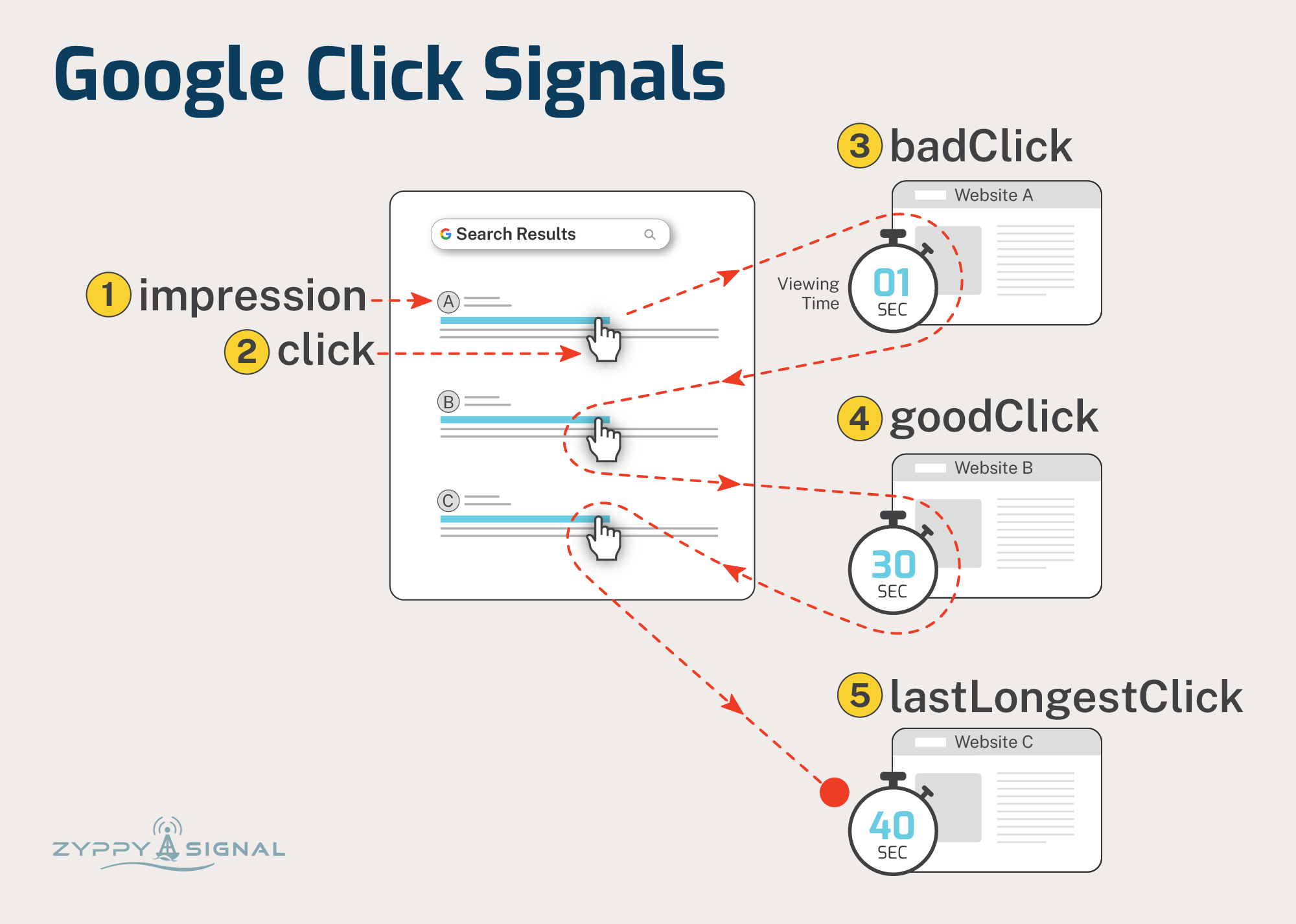
impressions - When a URL appears in a search result. Importantly, Google seems to “test” different URLs in different positions in search results to determine which ones perform best.
clicks - When a user clicks on a search result. If users frequently click on a particular result relative to its impressions, Google may treat that as a positive signal.
badClicks - “...a short click can be considered indicative of a poor page”. E.g., if users click a result and immediately click back to the search results, it may be a clue that the page didn’t satisfy their question.
goodClicks - “...a long click can be considered indicative of a good page” and “historically, how long a user stayed at a particular linked page before bouncing back to the SERP.”
lastLongestClicks - “The number of clicks that were last and longest in related user queries.” Long clicks, where “the user doesn’t return to the main (search) page,” can indicate that the page satisfied their question. (Sources: 1, 2, 3)
A picture is worth a thousand words, so here’s how these concepts play out when a user searches Google. Credit to Dawn Shepard for the graphics.
How Click Data Informs AI Answers (Nerd Section)
We’ve known for a long time that Google uses click data to build and re-rank search results via algorithms like NavBoost and Glue.
In fact, Google calls clicks one of its “three fundamental signals” or “ABC” - Anchors (links), Body (text), and Clicks.
Now you might assume that answers from AI models (LLMs) wouldn’t need click signals, but this is increasingly not the case due to several factors:
Google grounds its AI answer with algorithms (FastSearch / RankEmbedBERT) that use “70 days of search logs plus scores generated by human raters.” (source) These search logs contain click data and help generate the reference citation links Google includes in AI answers.
Answers from Google AI Overviews and AI Mode often summarize top-ranking results (and top-ranking results of fan-out queries). Those top results are surfaced, in part, using click data.
Other AI platforms, like ChatGPT, rely on Google search results to generate responses. Even though OpenAI has access to Microsoft Bing’s search results, “it appears those aren’t enough to replicate Google’s accuracy at scale, especially for obscure or long-tail queries.” - Tom’s Guide
While Google files lawsuits to limit other AI companies’ access to Google results, the influence of Google click signals on ranking and visibility is everywhere.
Note: There’s a fair amount of debate about whether Google uses clicks as a direct ranking signal or more for machine learning and evaluation. There’s also evidence that Google can simply predict clicks without actual data. Regardless, you almost certainly want your webpage to “look” like the kind of result Google believes will satisfy visitors.
The Playbook: Optimize for Relevance, Engagement, and Satisfaction
From the evidence, Google is trying to answer three broad questions from user click data:
Is this result relevant?
Is the content useful to answer the question?
Does this completely satisfy the user search?
Let’s examine each in turn.
1. Prove Relevance - Earn The Click
The idea seems simple: Google displays a list of URLs it thinks are relevant to a search, then measures which results users actually click.
Get more clicks, rank higher. Right?
Not exactly. This is not a simple Click-through Rate (CTR) calculation.
Google itself says that clicks are very “noisy,” and factors like position and appearance can skew the data. They even have metrics that appear to punish “clickbait” titles.
So the goal is not “high CTR.” The goal is to earn good clicks by showing relevance to the user.
Your SERP snippet is your playground to accomplish this, and as marketers, we have a lot of ways to influence this appearance:
Intent - What exactly did they search for?
Promise - How does our content meet that need?
Brand - Who delivers that promise?
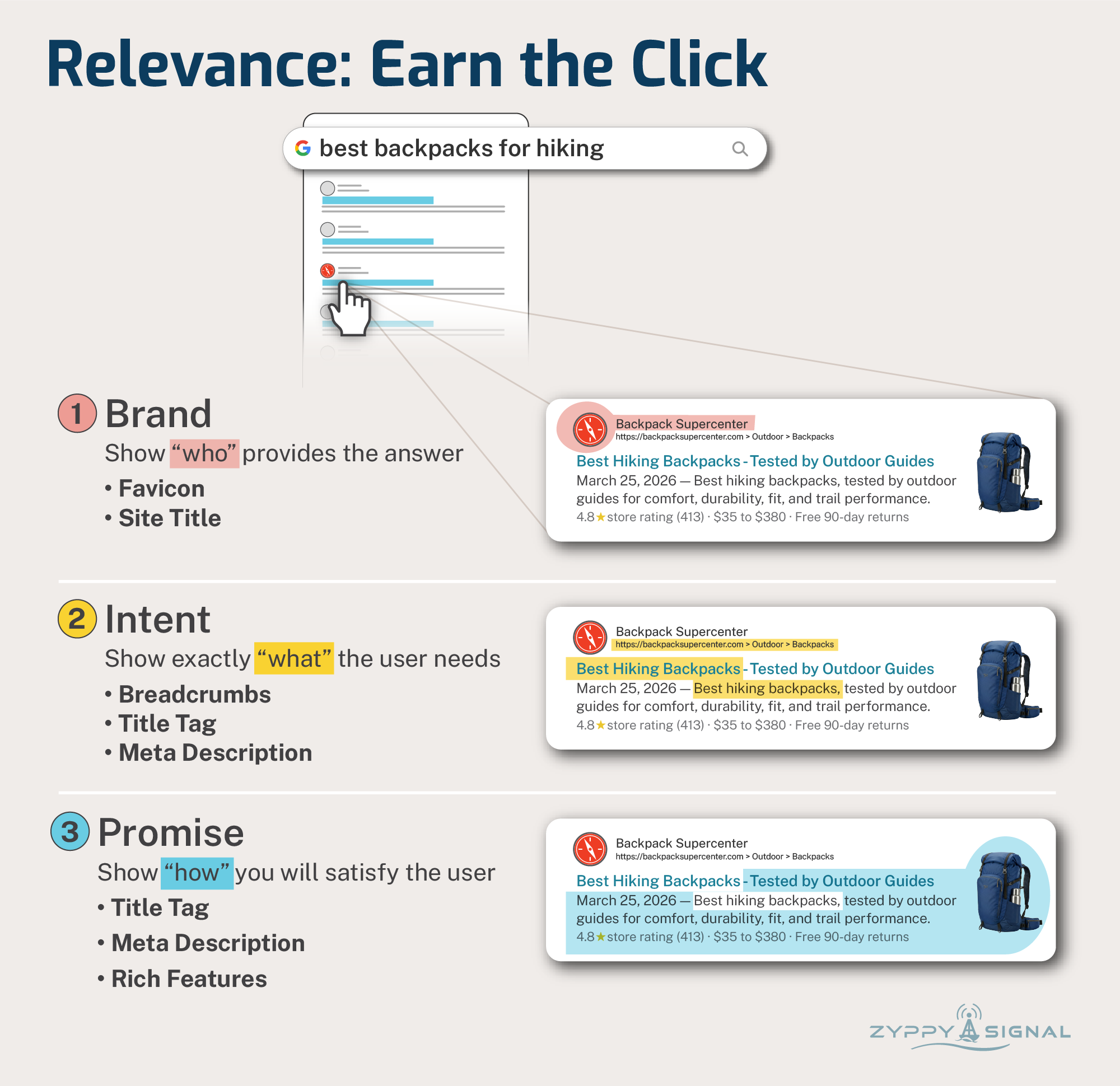
Again, and I cannot emphasize this enough, the goal is to improve CTR but not at the cost of relevance. Exaggerated or “clickbait” features may drive clicks, but they are not as relevant. Getting a high CTR without demonstrating usefulness and satisfaction (steps 2 and 3 below) can lead Google to associate your site with very bad signals.
So a high CTR is good, but it needs to be paired with other signals…
2. Prove Usefulness - goodClicks vs badClicks
The evidence is consistent: Google appears to measure long/good clicks by observing how long a user visits a result before returning to the search results.
Except, of course, it’s not that simple.
This isn’t exactly “dwell time” or “time on page.”
That’s because Google weighs each click time by query, user type, language, and country.
Then they can compare these scores with those from all other possible query-document combinations. One Google patent describes measuring the ratio of long clicks to overall clicks, and this click fraction “can be used to re-rank future search results.”
By using weighted clicks, Google understands that not every visitor needs the same amount of time for every search. For example, a user checking “how tall is Mount Everest” may only need a few seconds, while a question like “optimize investment portfolio for inflation” might take several minutes.
Context is everything.
The goal isn’t simply to improve time on site, but to demonstrate usefulness through engagement.
We can accomplish this with basic User Experience tools, but these practices often get lost in the realities of building web pages. Here’s what it can look like in practice.
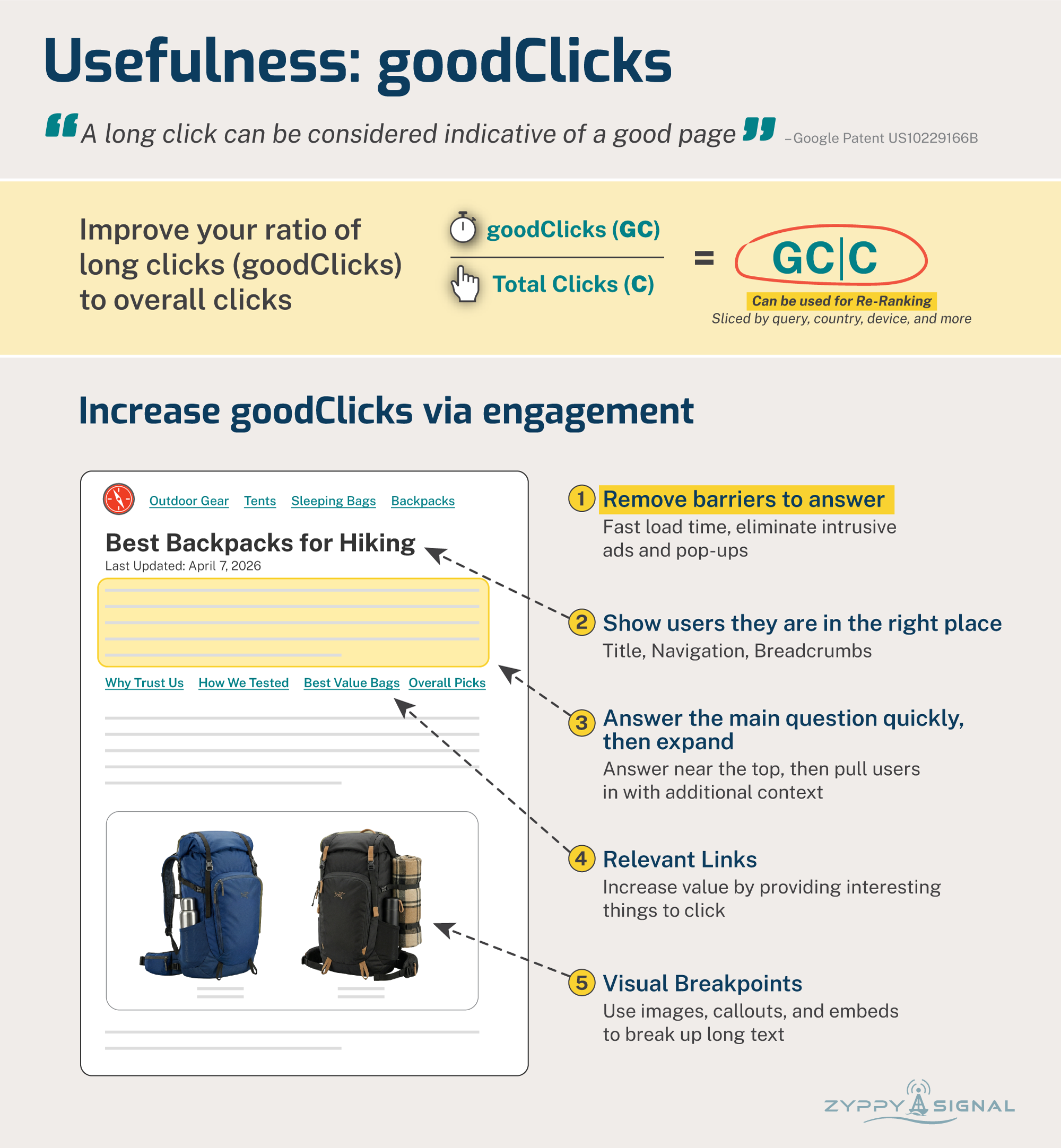
You may think that answering the user query “quickly and obviously” isn’t the best way to earn “long clicks,” but there’s plenty of anecdotal evidence across the industry that it often leads to better traffic. (This may be related to step 3 - lastLongestClicks, but for now, we’ll focus on engagement.)
Note: Google has repeatedly said “time on site” isn’t a ranking factor, which makes sense given the evidence. They obviously slice the data in much more complex ways than that.
That said, many, many studies have found a positive correlation between time on site and Google rankings. In one study, our friend Backlinko found that “increasing time on site by 3 seconds correlates to ranking a single position higher in the search results.”
And, my marketing friends, time on site through better engagement is something we can influence.
3. Prove Satisfaction - lastLongestClicks
Perhaps the holy grail of click signals: lastLongestClicks. Consider this user journey:
User asks Google a question
Clicks into your website
Engages with content
Gets the question 100% answered
Doesn’t go back to click another result
Congrats, you earned the last, long click!
Each step builds on the others. In addition to earning the click and engaging the user, you also want to be the last place they search.
How do you do this? You can start by:
Answering related questions
Show your evidence
Providing the user with the next steps
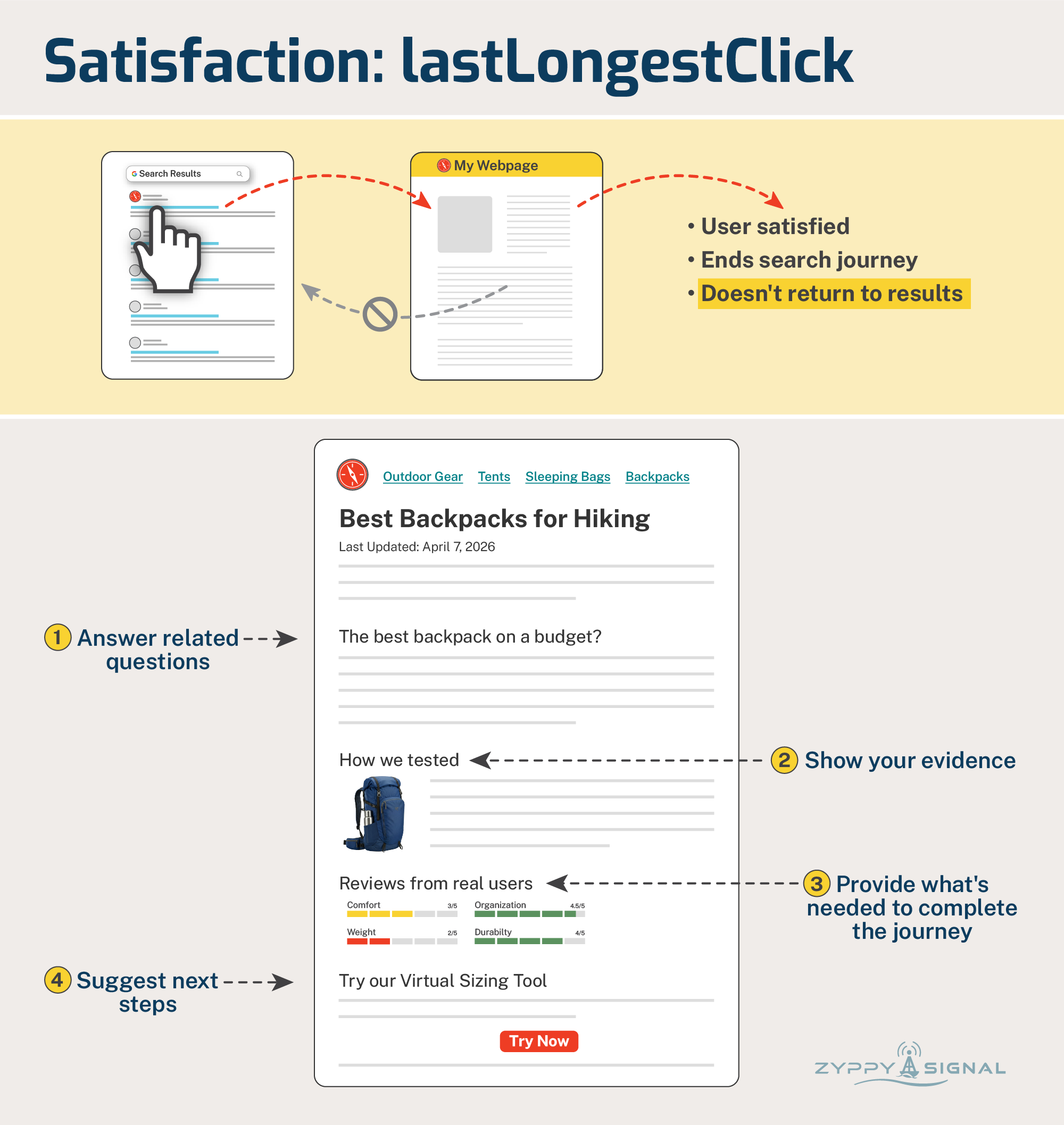
The goal here is to anticipate the next user need to complete their task. I love this example from AJ Kohn:
“If you are a local directory site, you usually have reviews from your own users prominently on the page. But it’s natural for people to wonder how other sites rate that doctor or coffee shop or assisted living facility. My recommendation is to display the ratings from other sites there on your own page. Why? Users want those other ratings. By not having them there, you chase users back to the search results…” (source)
If the user requires additional information to complete their search journey, you are better off providing it when they need it rather than having them leave to search elsewhere.
Things to Know: Manipulation is Hard By Design
One thing we should note is that these click metrics are, by design, incredibly hard to “game.” Google employs multiple techniques to ensure click signals reflect genuine user reactions:
Navboost, one of Google’s most important algorithms, memorizes 13 months of user interaction data. This long timeframe adds stability and means changes happen slowly. (As noted above, FastSearch uses 70 days of data.)
Google calculates a “squashed“ value for many of its metrics, which presumably filters out spam, manipulated, and/or noisy signals.
Not all user interactions are equal. “Slicing“ weighs each user click against the ranking position, the query, the device, the user’s location, and a host of other factors.
That said, there is anecdotal evidence that click spoofing (employing bots or humans to click on your search results) can sometimes temporarily boost rankings, but the effect is generally short-lived and potentially risky.
Measuring Clicks By Proxy
You can’t improve what you can’t measure. Unfortunately, Google doesn’t share click data, and it’s nearly impossible to measure individual clicks with any granular detail.
That said, there are many metrics we can measure that correlate with click data and deliver independent value. The important part to remember is that, since you can’t typically see competitors’ data, you are essentially competing against yourself.
1. Click-through Rate
You can measure CTR in Google Search Console. It’s tricky because CTR changes drastically by position, and impressions from AI answers muddy the waters. It’s typically easiest to measure CTR across broad sections of your site using URL patterns. Tools like SEOTesting and SEOGets can help track CTR.
2. Engagement
My absolute favorite metrics to measure are Engagement and Time on Site. Google Analytics 4 (GA4) may be everyone’s least favorite analytics tool, but I believe GA4 did us a big favor with the Engagement report, which shows us “Average engagement time per active user” and other metrics. (Remember to filter by organic search traffic.)
For those with a budget, competitor engagement metrics can be determined using Semrush Traffic and Market or SimilarWeb.
Remember, “Time on Site” isn’t itself a ranking factor, but it seems to play an outsized role in how Google calculates other metrics.
3. Satisfaction
There isn’t “one” metric to track visitor satisfaction. We simply don’t know if a user returned to search results. But there are a number of metrics you should track, regardless, as measures of brand strength.
Returning Users: Available in GA4. An increase in users returning to you via organic channels or otherwise is typically a good sign.
Conversions: Especially relevant to e-commerce, but applicable to other verticals as well. If a user makes a purchase, it’s a pretty good sign that you satisfied their journey.
Brand Search: The Holy Grail of search terms. When a user specifically searches for your brand, their journey can both start and end with you. In fact, all marketers should probably report branded search. And with branded search filters now available in Search Console, we have no excuse not to.
And here, we’ve reached the end of our own search journey. How do you think you can improve your own user click signals?
Want to discuss or have questions about Google Click Signals? Join the subscriber chat.