


Home | AI SEO Marketing | Pro Templates
👋 Subscribe free (it helps me produce research like this) and get the 7-Step AI Citation Checklist with tips + tactics on how to win more AI visibility. Already subscribed? Check your inbox.
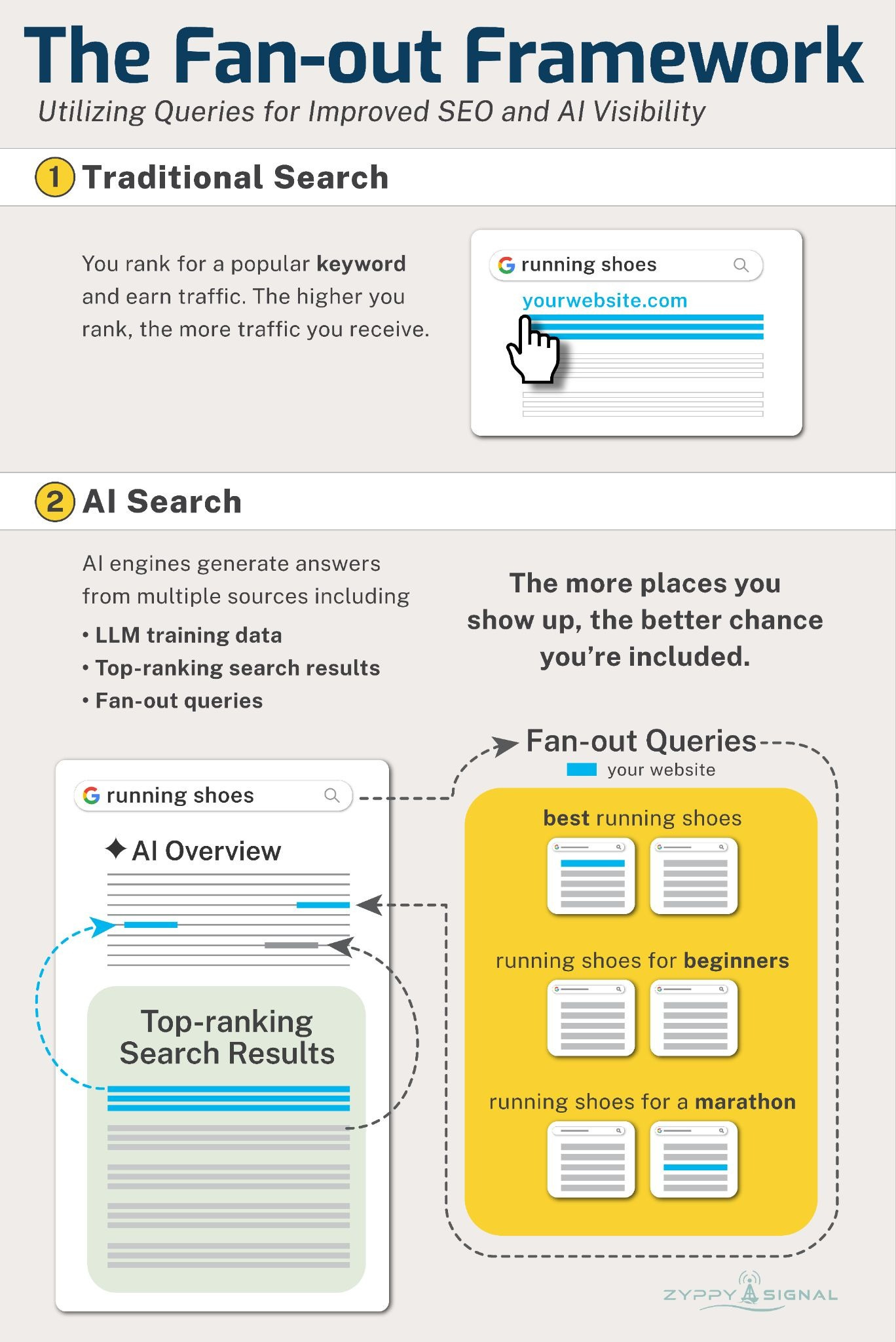
Traditional SEO starts with keywords.
The idea was simple: you ranked for a keyword people searched for, and you received traffic from Google.
But AI answers are more complex.
AI engines generate answers from multiple sources, including LLM training data, top-ranking search results, and fan-out query results. Fan-out queries are specific sub-queries that AI engines create in the background. (iPullRank offers an excellent, detailed explainer.)
It then synthesizes all that information before formulating a final answer.
The more places you show up in the AI’s research, the better your chances are of being included in the final answer.
So how do you optimize for this?
Ranking in Google (and other search engines) for the primary keyword can help you get to the AI answer, but it is often not enough. Ranking—or being mentioned—within the additional fan-out queries is one way to greatly improve your chances.
As an SEO consultant, I see many companies and agencies using frameworks to optimize for fan-out queries to gain more visibility in SEO and AI, but I haven’t seen a good guide on exactly how to do it.
So I wrote this one. The process is super-simple.
Use a keyword you already rank for
Find common fan-out queries
Determine the most important fan-out topics
Optimize your page—or create new pages—for the fan-out queries
Measure the results
At this point, experienced SEO will recognize this looks a lot like “optimizing for related queries.” That’s because it is very similar, with a few critical tweaks.
1. Find a keyword topic you already rank for
Here’s something every marketer should know: the #1 predictor for appearing in AI answers is ranking highly in regular search results.
A study from Ahrefs showed that 38% of Google AI Overview citations come from Google’s top 10 ranking pages
AirOps found that ChatGPT cited page ranking #1 in Google 43.2% of the time
Data from Semrush showed AI answers from Perplexity had an 82% overlap with Google’s top 10 results
This means that if you already rank in the top 10 of Google results, or even the top 20, you have a good shot of appearing in or being cited in the AI answer.
Additionally, if you rank for multiple fan-out queries as well, your chances of appearing in AI may be stronger still.
How do we find keyword topics we already rank for? The best place is typically your Google Search Console account.
Here’s a real example from one of my own websites. My page about title tags ranks on page 1 of Google for a bunch of “title tag length” queries, but it doesn’t get many clicks - likely because people are getting their answers from AI Overviews.
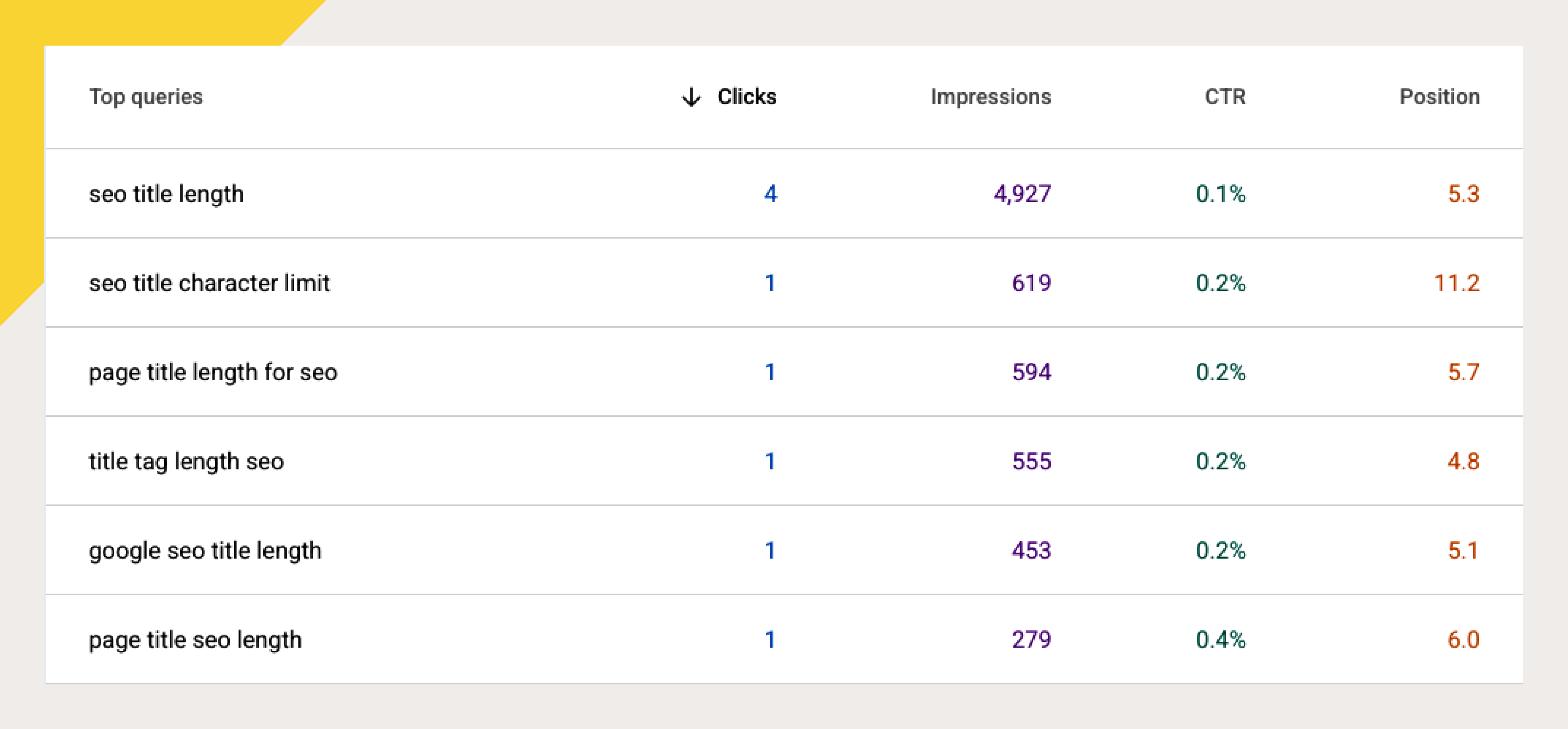
For this example, “seo title length” and related queries are what we’ll try to optimize for.
2. Find Fan-out Queries
Before we determine which fan-out queries to optimize for, we need to address an important point: the fan-out myth.
The fan-out myth is that for any given search, there is a stable, pre-determined list of fan-out queries for that search.
Nothing is further from the truth.
Fan-out queries, like AI, are probabilistic and personalized, and they vary greatly across AI models and even within user sessions.
This means you can perform the same search 10 different times using the same AI engine and get 10 different sets of fan-out queries. The differences become even greater when using different AI platforms.
But that’s okay. Fan-out queries will never be entirely stable, but they can be broadly similar.
The key is to identify the commonalities and optimize around those.
Our job now is to gather as many fan-out queries as possible. Keep in mind, there are dozens of tools and techniques for finding fan-outs, and they are all different. There is no “best” way to find fan-outs, but here’s a process I personally like to use.
Use QueryFan
In my opinion, QueryFan is one of the best all-around query-fan out generators.
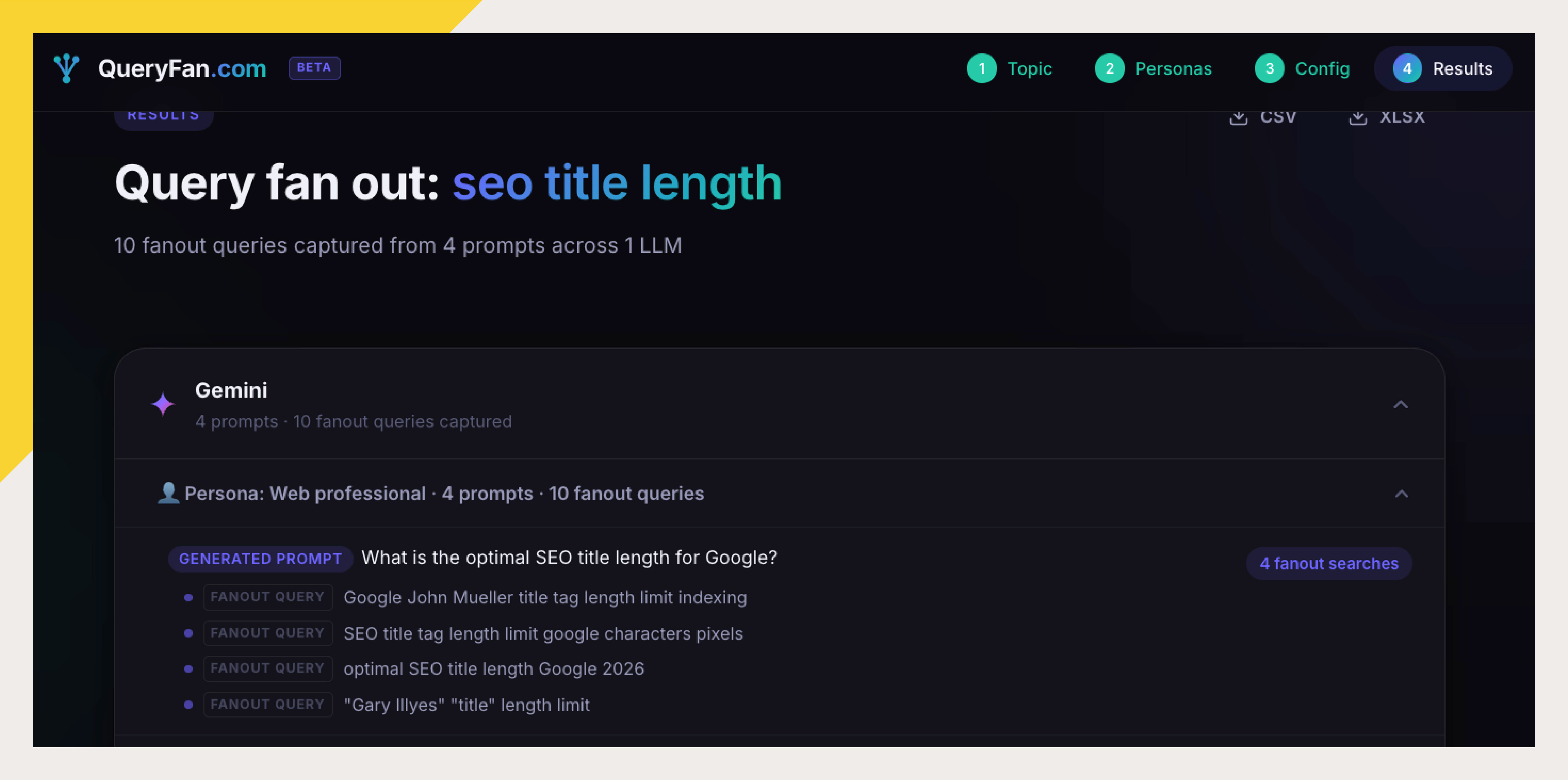
Queryfan works best with a paid OpenAI or Gemini API key.
If you’ve never used an API before, it’s really easy to generate a key, and you don’t need any special skills. Here’s a video on generating an OpenAI API key
Here’s how to generate an API key with Google’s Gemini.
You can set up a Gemini API key for free (OpenAI requires a paid subscription), but in my experience, it’s better to add a billing method. Retrieving query fan-outs has never cost me more than a buck or two.
For richer results, you can also add an AlsoAsked API key, which requires a Pro plan. You can sign up for an AlsoAsked plan here.
QueryFan lets you define “personas” that simulate real users’ profiles. If you want broad, generic fan-outs, feel free to skip this step.
When the tool finishes, export all these results into a spreadsheet.
Use Qforia
For Google specifically, Qforia is another great tool for generating query fan-outs. (It also requires a Gemini API key)
Qforia lets you upload multiple search queries at once and switch between AI Overview and AI Mode.
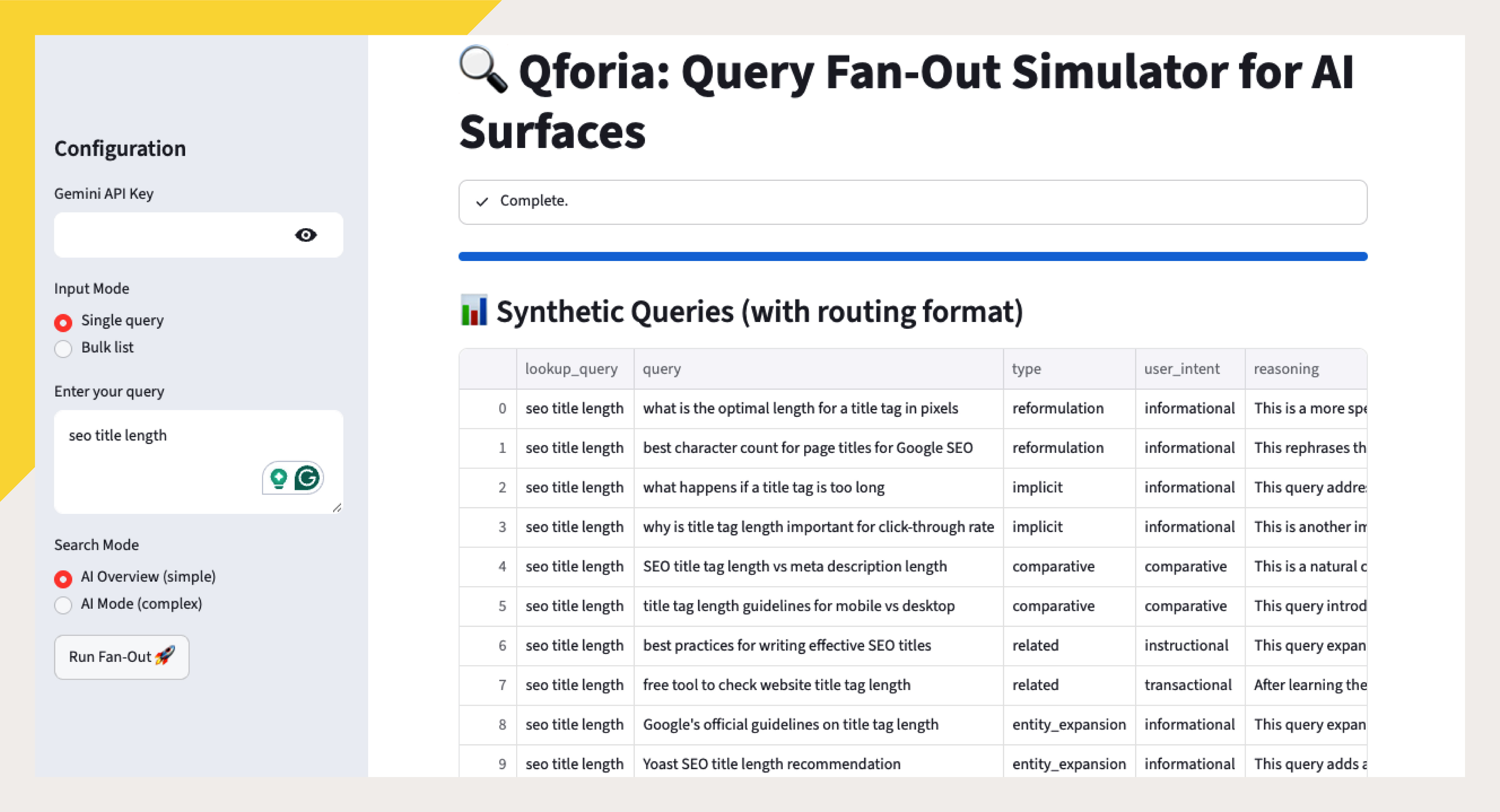
You’ll also want to export these results to your spreadsheet.
Non-API Options: If you don’t want to deal with API keys, Dejan’s queryfanout.ai and Otterly’s Query Fan Out Analysis tool are great options.
Use Bing
Bing Webmaster Tools shows you all Grounding Queries in its AI Performance Report.
Technically, grounding queries are different from fan-out queries. In fact, they are opposite, but related. Fan-out queries are used by the AI to seek out new information, while grounding queries are used to verify and fact-check existing information.
Practically speaking, there’s a good amount of overlap between grounding and fan-out queries, so it’s likely a good idea to include these in our analysis.
Here are all the grounding queries for our title tag page.
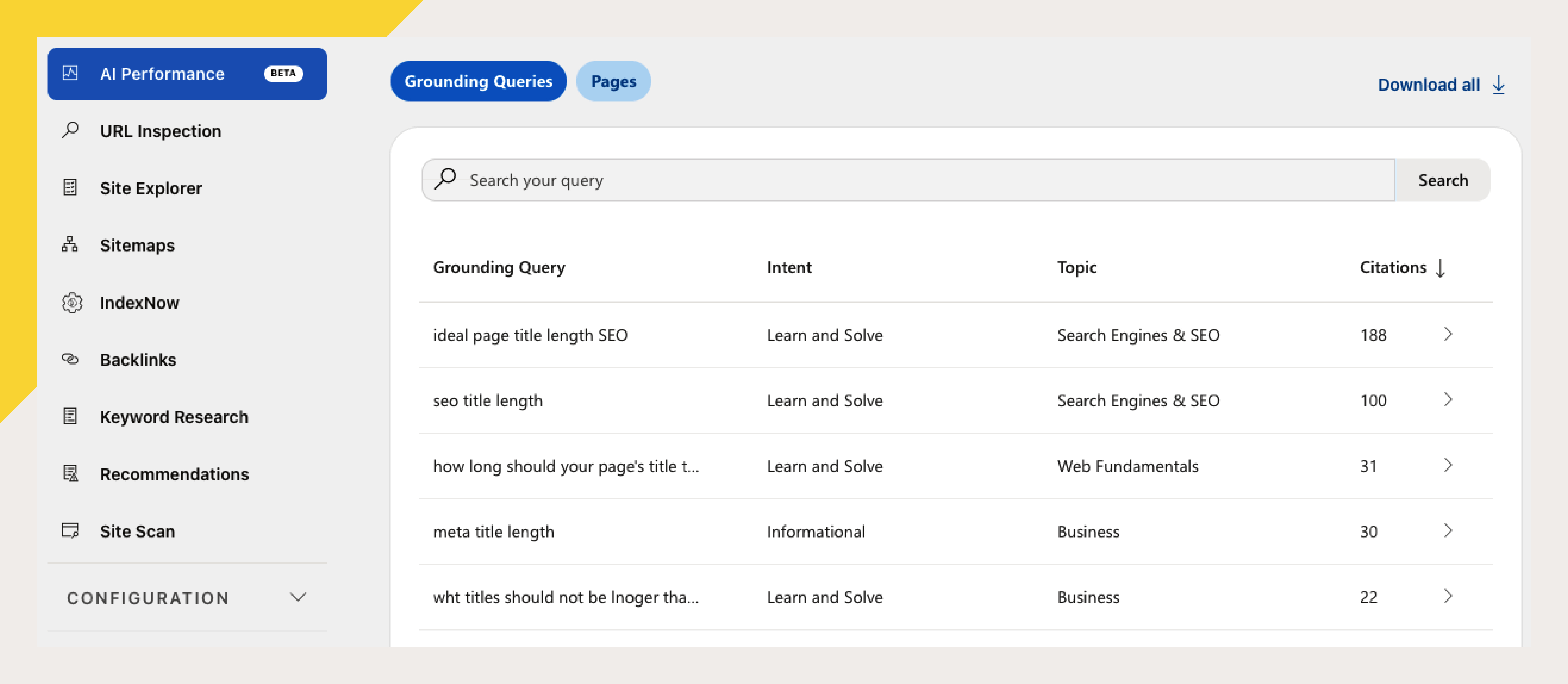
We’ll add these to the spreadsheet.
Creating Synthetic Fan-out Queries With AI
You actually don’t need any special tool to get fan-out queries. You can simply ask AI to do it.
But you need to give it the right prompt.
Many fan-out tools work by creating synthetic fan-outs using AI to simulate what the fan-outs could be. When fine-tuned, this can work as well as recording actual fan-outs.
In fact, you can do this yourself using nearly any AI engine. Try the following simple prompt. (You can modify this as you wish.)
You are an expert SEO strategist and search intent analyst. Generate fan-out queries for this seed search phrase:

[INSERT SEARCH PHRASE]

A fan-out query is a realistic search query that helps satisfy the user’s underlying information need behind the seed phrase. It may restate, refine, define, compare, troubleshoot, or apply the topic to a specific platform, audience, tool, or use case.

Return 50 total queries grouped under these headings:
Primary intent queries
Supporting subtopic queries
Comparison queries
Problem/solution queries
Audience or use-case queries
Decision-stage queries

Rules:
- Stay tightly connected to the seed phrase, its intent, and the subtopics needed to answer it well.
- Include exact-intent variants, follow-up questions, definitions, attributes, examples, comparisons, problems, fixes, tools, platforms, and use cases when relevant.
- Use natural search-query wording.
- Include short-head, mid-tail, and long-tail queries.
- Avoid broad, vague, off-topic, redundant, awkward, or unlikely queries.
- Do not force commercial, tool, platform, or “best” queries unless they naturally fit.
- Put each query on its own line.
- Do not number queries.
- Do not include commentary.

Silently remove anything that is not useful for SEO content planning.
Run this, and we’ll add these to our spreadsheet.
3. Determine Your Most Important Fan-out Topics
At this point, you’ll likely have a lot of fan-out queries in your spreadsheet.
Too many, in fact.
Our “seo title length” spreadsheet now has nearly 400 possible fan-outs!
You’ll likely find many fan-outs that are slightly irrelevant, off-topic, repetitive, or so specific that no one would ever optimize for them.
We need to clean up this data.
You could filter your fan-out list by hand, but it’s much faster and easier (and typically more accurate) to use AI to do it for you.
Here’s a sample AI prompt you can use to clean up your list.
You are an expert SEO strategist and keyword researcher. I will give you a primary search phrase and a raw list of fan-out queries.Your job is to clean, filter, and consolidate the list into a focused keyword set for SEO content planning.

Primary search phrase:
[INSERT SEARCH PHRASE]

Raw fan-out queries:
[PASTE QUERY LIST]

Instructions:
1. Identify the core search intent behind the primary phrase.
2. Remove queries that are obviously not useful for ranking a single strong page for that intent. Remove:
- Different meanings of the main words
- Broad or generic topic drift
- Loosely related subtopics
- Queries better suited to a separate article
- Unrelated tools, platforms, trends, news, jobs, salaries, rules, or frameworks
- Duplicates, awkward phrasing, or unlikely searches
Do not remove adjacent queries if they directly support the primary topic’s specific angle.
3. Keep queries that naturally belong on the same page and help explain, expand, compare, refine, or satisfy the core intent, including:
- Core synonyms
- Beginner questions
- What/how/why/best/vs/for variations
- Problem and solution queries
- Comparison queries
- Attribute, feature, tool, process, or platform-specific queries, when relevant
4. Consolidate duplicates and near-duplicates.
Choose the clearest, most natural search phrase for each group.
Do not list multiple queries that mean essentially the same thing unless they represent meaningfully different search behavior.
5. Create:
- 20–25 primary keywords worth targeting directly
- 5–10 optional secondary queries to include naturally
Primary keywords should cover the strongest recurring intent clusters, not just close synonyms of the head term.
Optional secondary queries should be useful supporting concepts, not a dumping ground. Include them only when they add topical coverage but are too narrow, tool-specific, platform-specific, use-case-specific, or low-priority to be direct ranking targets.
Be strict. Do not include weak queries just to reach a count.

Output format:
Obvious off-topic buckets:
- [Bucket]: [brief examples]

Consolidated target query set:
1. [keyword]
2. [keyword]

Optional secondary queries:
1. [query]
2. [query]

Do not include a page structure or extra commentary.
Using this process, we’ve narrowed down our list of fan-out queries to a more reasonable list:
1. seo title length
2. title tag length
…
24. HTML title tag vs SERP displayed title
25. title tag length examples
We also have several related fan-out topics:
1. Google Search Central documentation on page titles
2. SEO title length for WordPress
3. SEO title length for Shopify product pages
… etc.
At this point, you could simply review your fan-out queries and identify topics that you don’t rank for or don’t cover well, and optimize around those.
But I’m going to add a couple of steps to make our jobs easier. These next steps are completely optional.
Get Search Volume for Query Fan-out Topics (optional)
You can use your preferred SEO tool to get search volume for your query fan-out topics.
Many, if not most, of your queries may have no search volume at all. That’s okay. If any do have existing keyword volume, this will help us prioritize those keywords.
Here, I’ve popped our query fan-out list into Ahrefs Keyword Explorer.
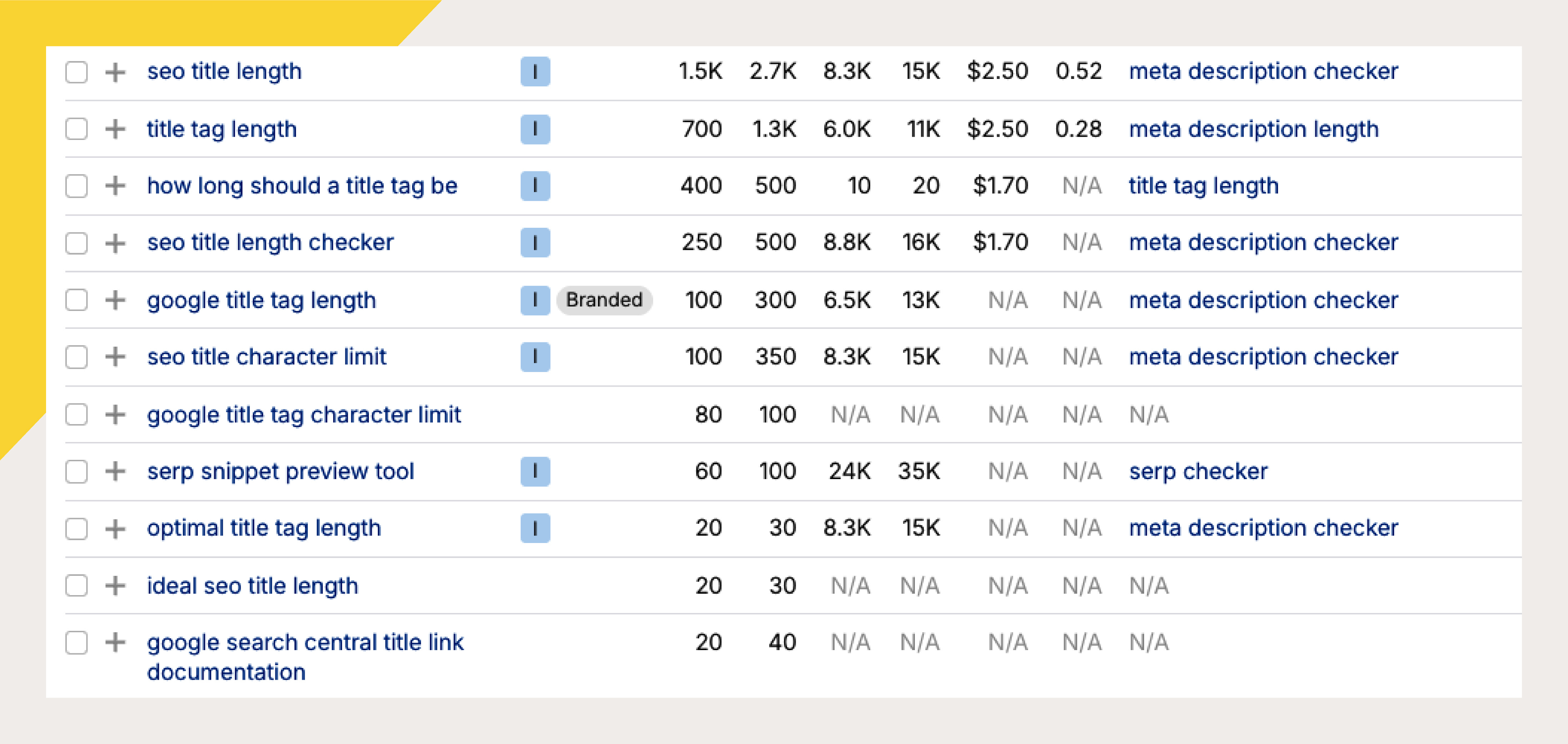
It looks like many of our fan-out topics do have significant search volume! We’ll want to pay extra attention to these.
Next, I use keyword clustering to better identify ranking opportunities and gaps in my content.
Keyword clustering is a technique that groups keywords together by search intent. It works by analyzing Google search results. If two different Google searches return roughly the same set of results, those keywords likely have the same intent and can be targeted by the same piece of content.
My favorite Keyword Clustering tool is Keyword Insights.
After giving Keyword Insights my fan-out queries and search data, it can perform various calculations.
Here, I can see how zyppy.com compares with competitors in terms of cluster visibility.
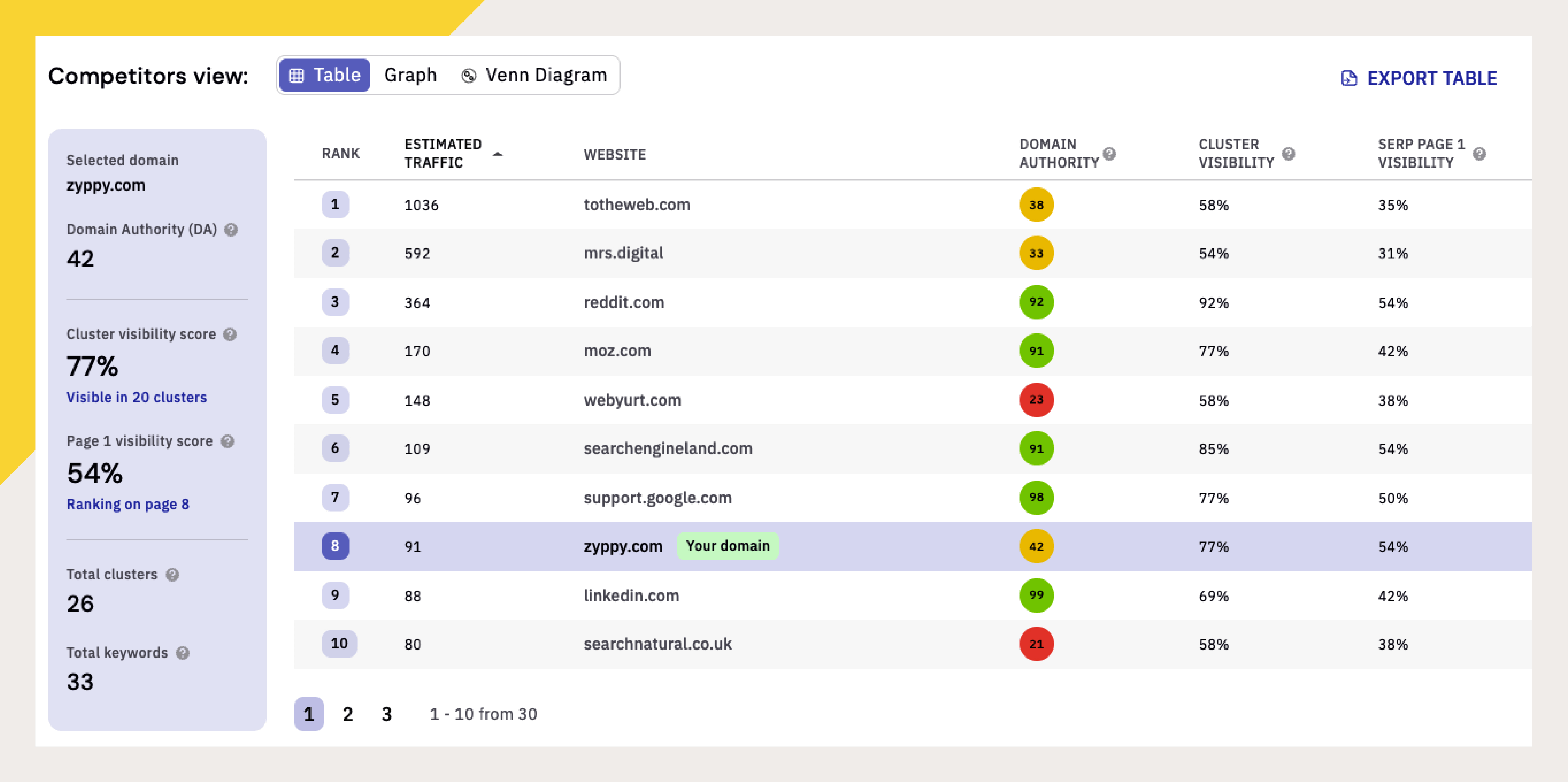
Not too shabby! But looks like there is room for improvement.
Looking at the cluster data itself, we can tell a couple of things about our project:
Our fan-out queries cover many distinct search intents
Despite this, our page already ranks really well for most terms (nice!)
We do have a number of gaps in our content coverage, so we can patch those up
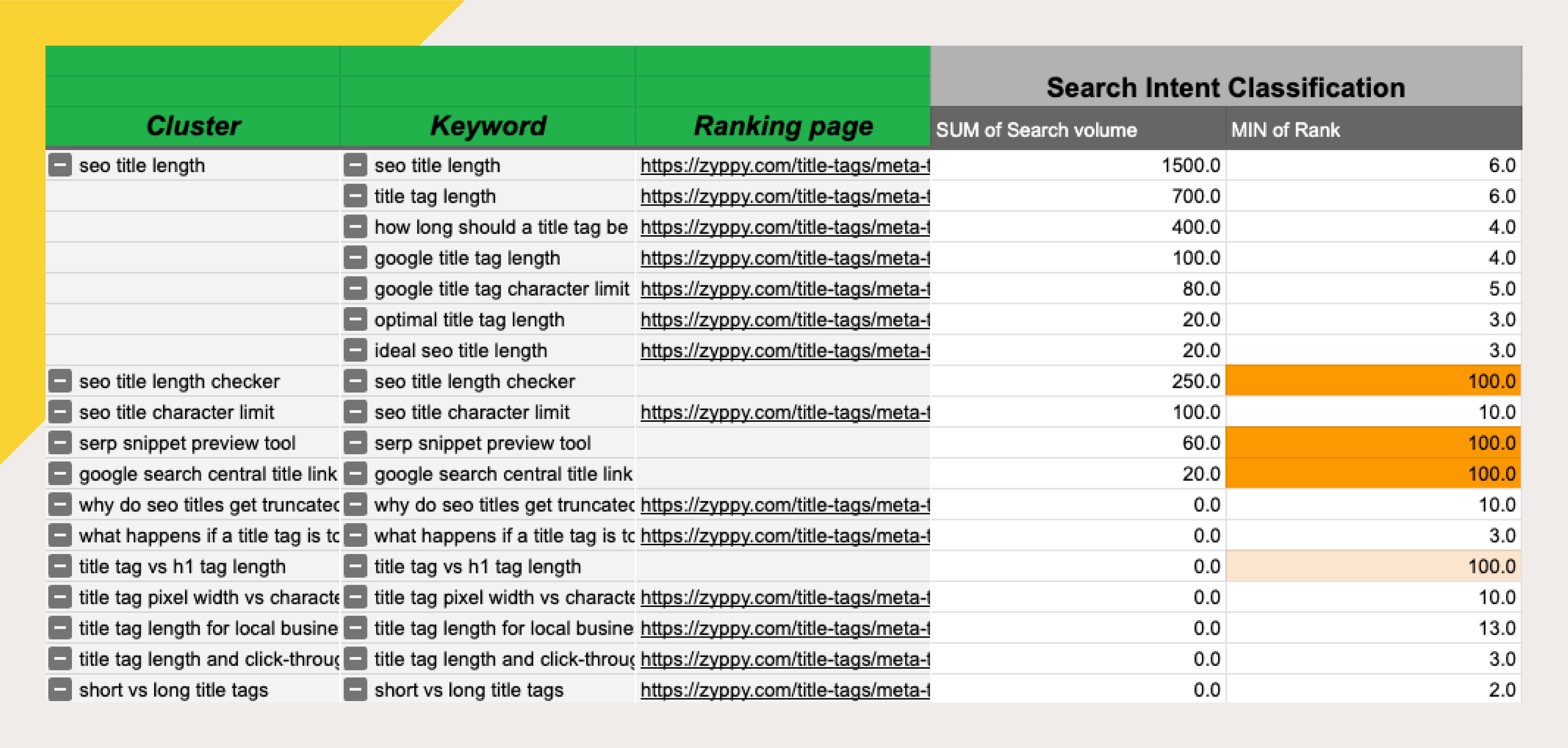
In this case, we’re missing a major keyword gap around “title length checker” and “serp snippet preview tool.” (We also see some optimization opportunities around “Google search central title link documentation” and “title tag vs. H1 tag length,” though these don’t seem quite as important.)
These might be good targets to optimize for, and they could help us earn both AI citations and some additional organic search traffic.
👋 Subscribe free (it helps me produce research like this) and get tips + tactics on how to win more SEO and AI visibility.
4. Optimize for the Fan-out Queries
Now we have a couple of specific query topics we’d like to optimize for: title length checker and serp snippet preview tool.
When optimizing for fan-out queries, we have a couple of options:
Create new pages covering the topic
Update our existing pages
Both approaches have their pros and cons. In this case, since the page is already ranking well and has strong authority, we’re going to update it with new information. This is also the easier route.
We’re not going to get into how to optimize a page to target a specific keyword (there’s lots of information out there already), but keep this in mind when optimizing specifically for query fan-outs:
Align your content to the fan-out query/answer.
This means using the query, or a close variant, in your headings (h1, h2, etc.) and following it immediately with the answer, however long that content is.
You really want to create content that’s worthy of ranking in the top 10-20 of Google’s search results. Otherwise, the AI engine may not see it.
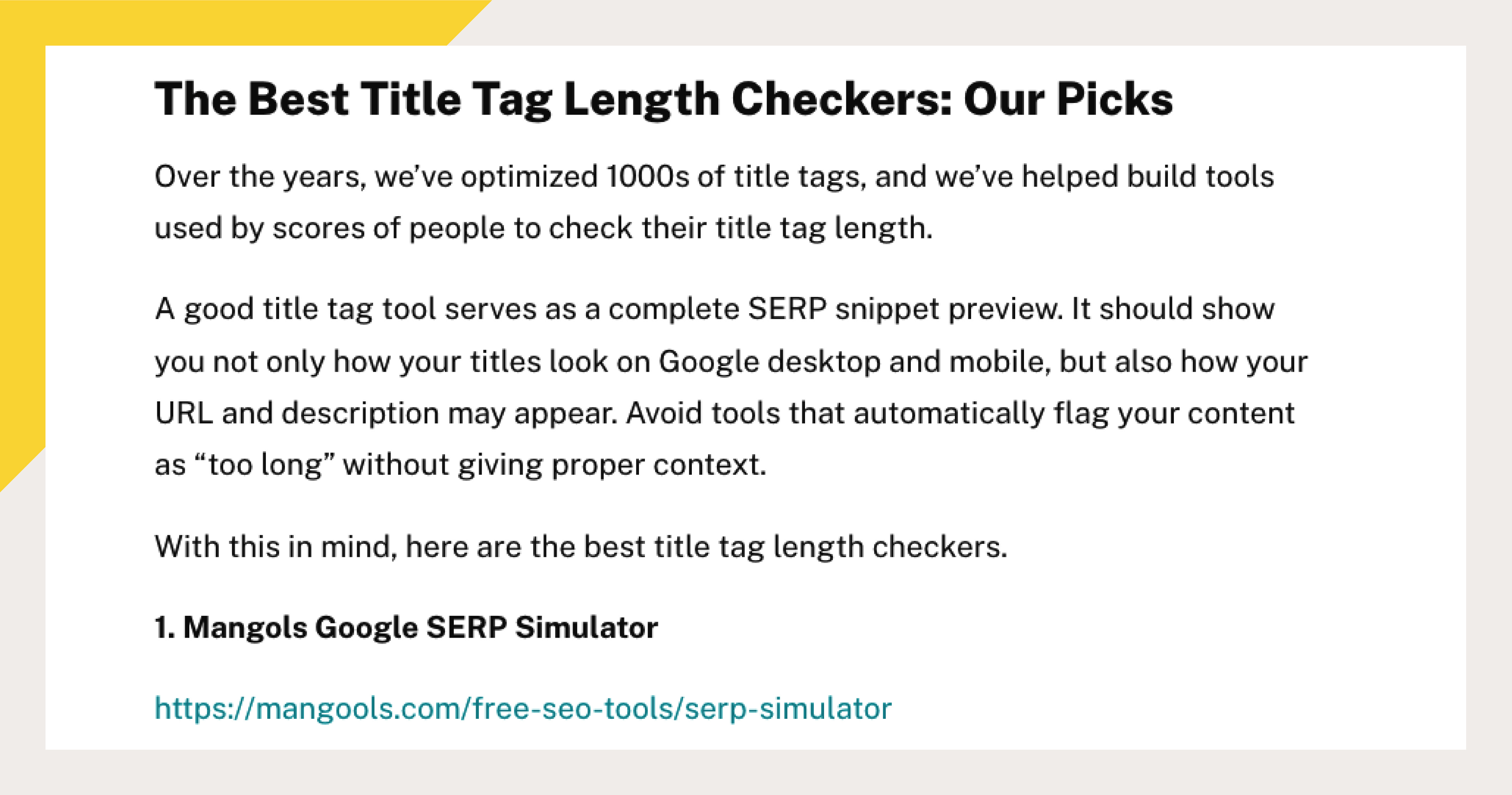
Here, I tested several title tag length checkers and added a new write-up to our article.
Optimization Tips
1. Don’t blindly add new pages covering every fan-out topic. This is not the way you want to go. Remember that AI engines prefer content that ranks highly, and lots of low-quality content isn’t going to help. In fact, in a time when Google is more and more demoting scaled content, this could definitely hurt you.
2. Don’t need to add every fan-out topic to your page. You don’t want to creat Godzilla pages. Keep your topics tightly focused, while working to completely satisfy the user.
3. Don’t add generic, non-commodity content. The same rules of content apply to fan-out coverage as they do to any type of content. Make it original! Add first-party information or personal perscpectives when you can. Keep generic content out.
5. Measure The Results
The good news is that you can often influence AI answers much faster than it typically takes to influence traditional search results.
First of all, while it’s not the most reliable method, you can simply check Google to see if you appear or are cited in AI answers.
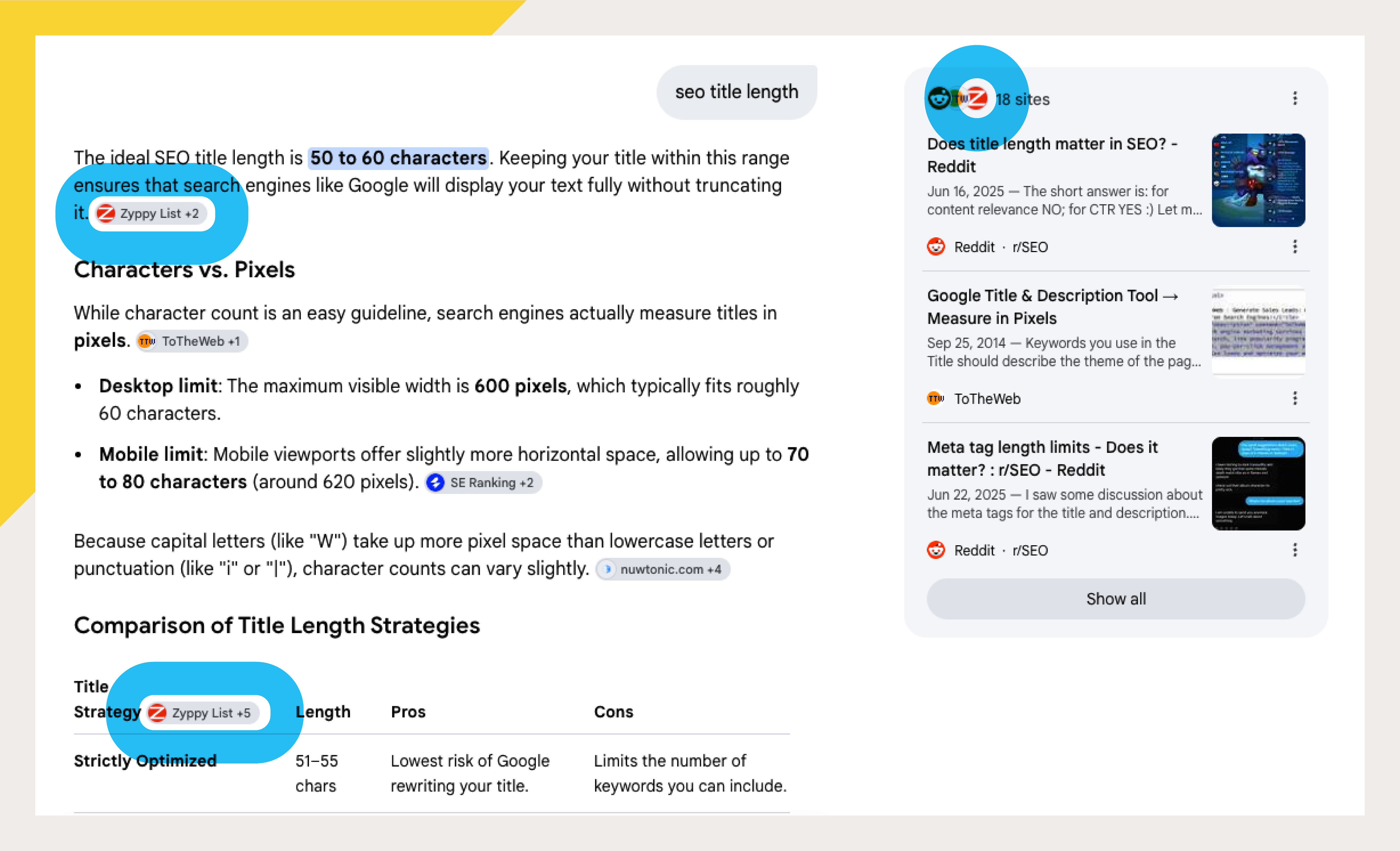
Be careful, though! Individual search results can be highly variable and personalized, so for more accurate tracking, you want a larger dataset.
The easiest and least costly way to check your AI visibility is through Google and Bing Webmaster Tools.
Bing Webmaster Tools AI Performance Report
https://www.bing.com/webmasters/aiperformance
Bing is ahead of Google in AI reporting. You can see how many citations each URL earned in AI answers, and also the grounding queries that led to those citations.
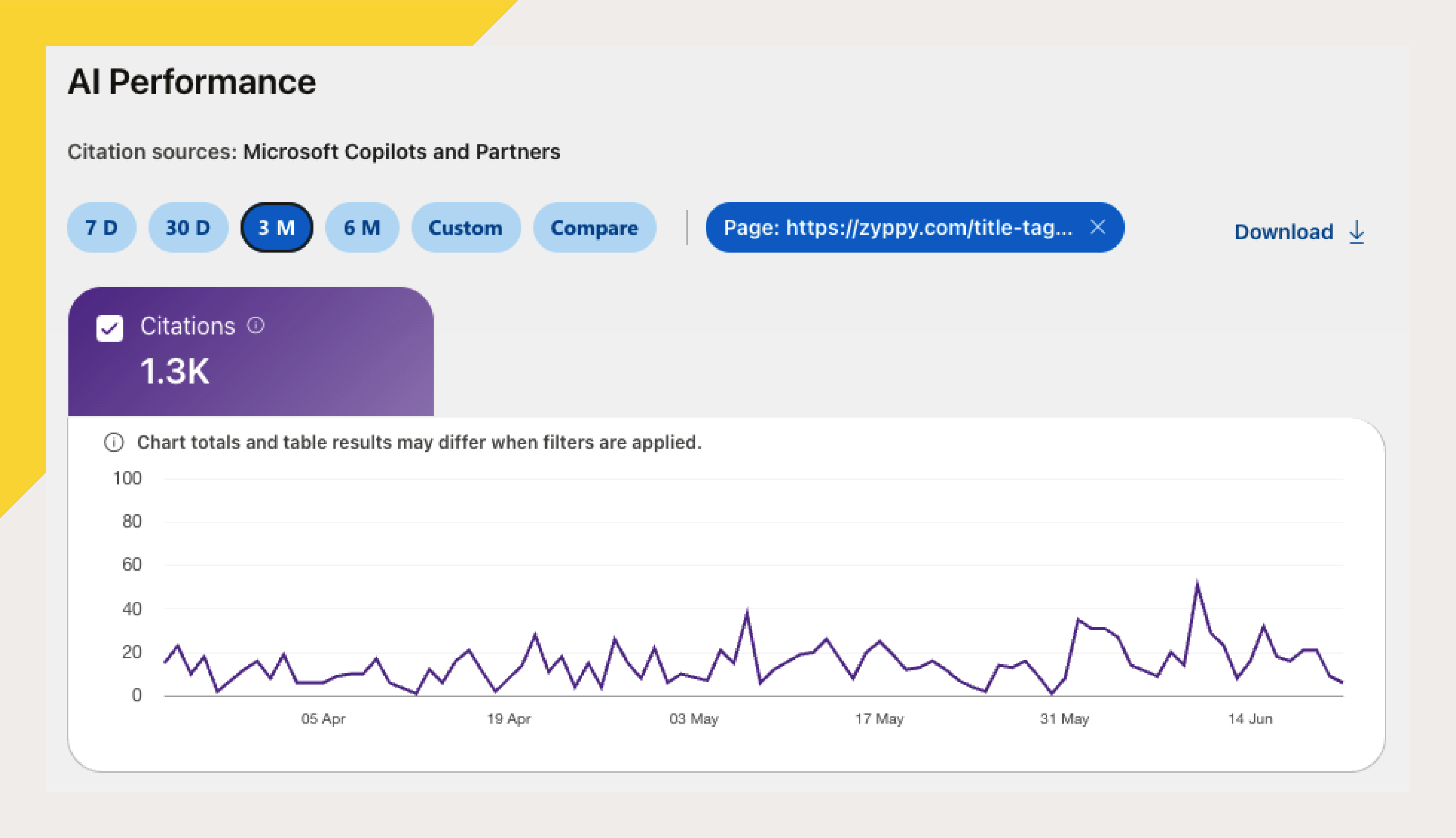
Here’s the actual report for our title tag page. On the right side of the chart, you can see a rise in citations after I made some improvements on the page.
Google Webmaster Generative AI Features
https://search.google.com/search-console/performance/search-analytics/ai
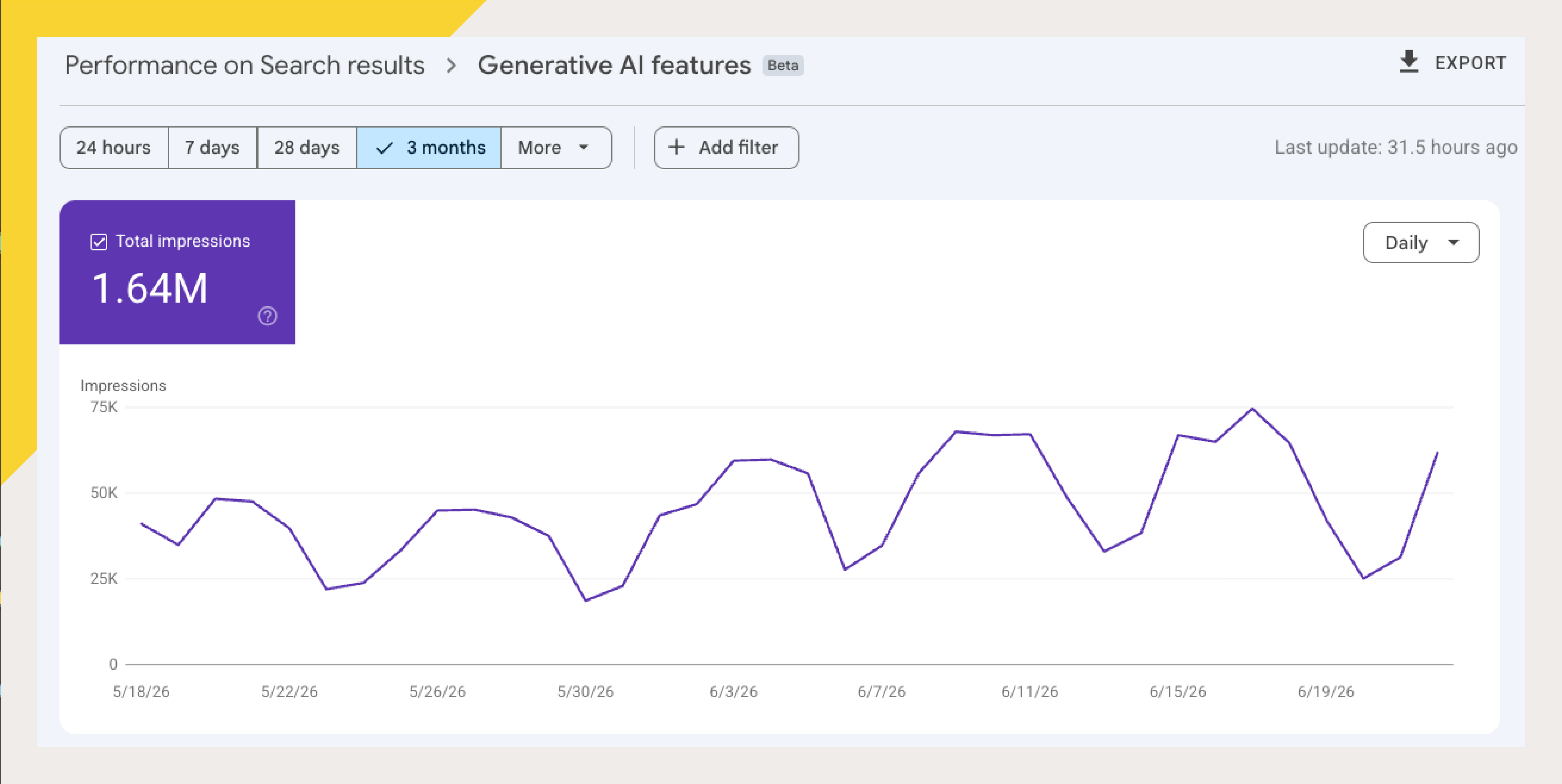
Google recently added an AI features report that shows how many times each URL appeared in Google’s AI Mode or AI Overviews.
Somewhat disappointingly, Google’s report does not tell you the grounding or fan-out queries that triggered these impressions.
Here’s what it looks like.
Premium Options
There are many professional AI trackers on the market, including Peek, Otterly, Profound, and Gumshoe.
Here’s what our fan-out queries look like in Ahrefs Brand Radar.
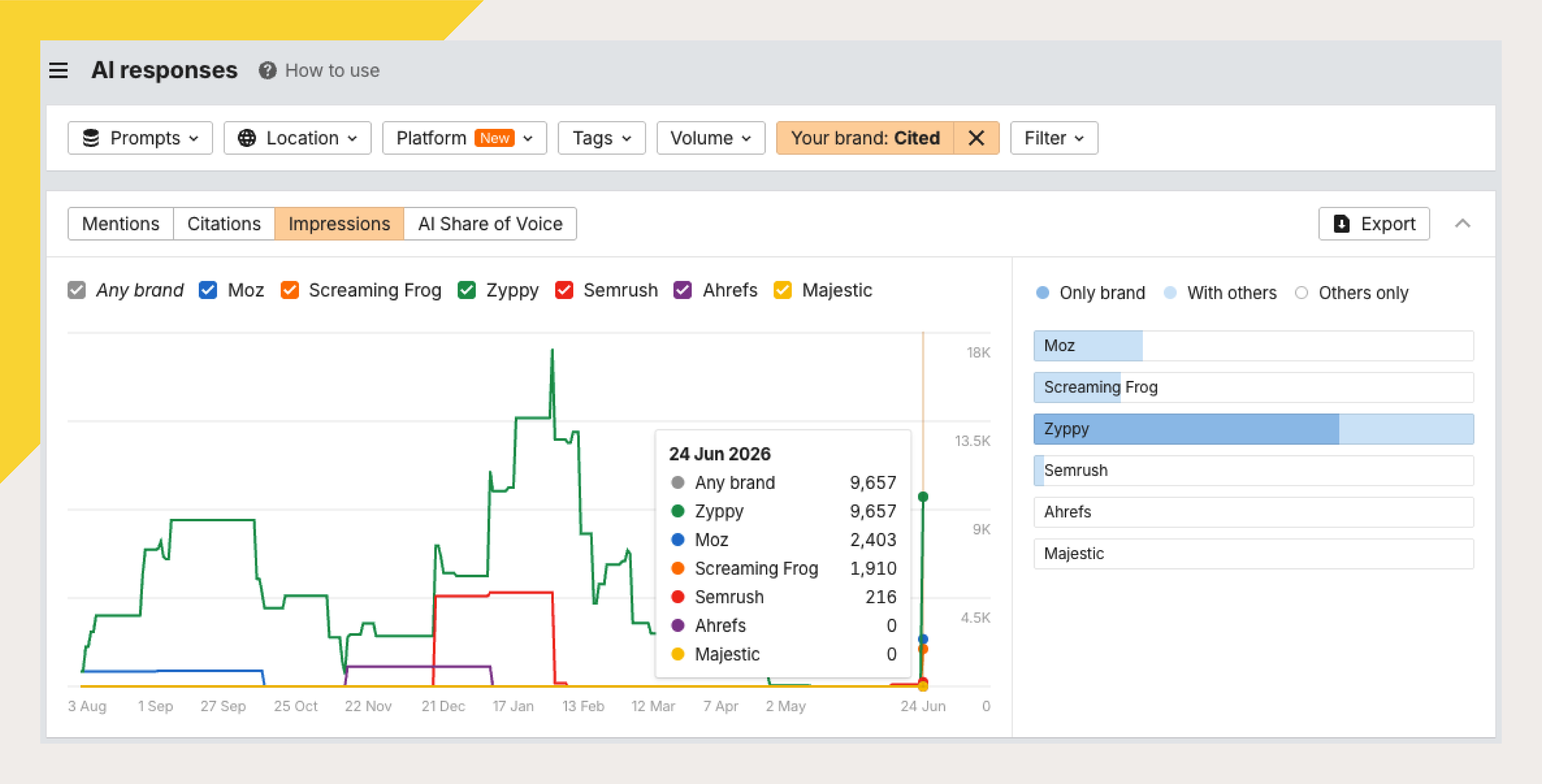
You can also estimate how many clicks you receive from LLMs using SEOTesting.
I’m not advocating for one AI tracking platform over another, or even whether you should have dedicated AI prompt tracking. That said, if you’re a large brand or AI is an important part of your search and discovery strategy, prompt tracking is often worth it.
Pro Bonus: AI Query Gap Analyzer Tools
The Fan-out Framework can be a very manual process, so I built two AI-based tools to do most of the legwork. These tools:
Evaluate your URL and your competitors for a specific keyword phrase
Generate and classify common fan-out topics
Identify gaps in your current content
Recommend specific content to cover common fan-out topics
Determine if it’s better to create new pages or update existing pages
One tool lives in ChatGPT, the other in Claude. Both require an account with one of these services. You can use the ChatGPT tool with a free account, though you’ll get better results with a paid account.
These tools are available for paid subscribers in Pro Templates.
1. ChatGPT: Zyppy Signal Query Gap Analyzer
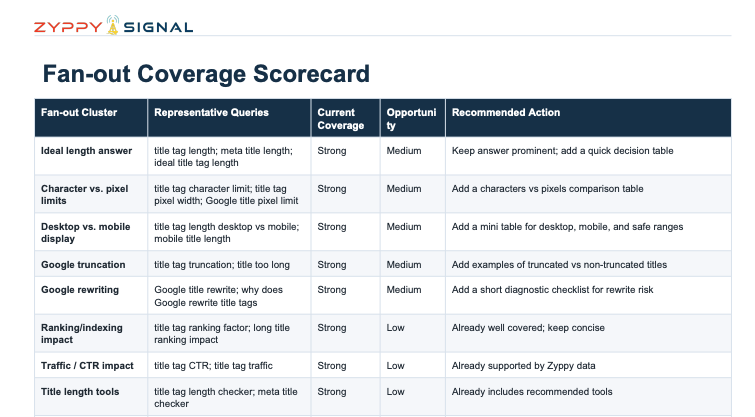
Give the Query Gap Analyzer a primary keyword and a URL, and it looks at:
The core intent behind the keyword
The most useful fan-out queries related to that intent
Which query clusters does the page already cover well
Which clusters are only partially covered
Which important topics are missing entirely
Whether those missing topics belong on the same page or should become separate content
The report includes a fan-out query set, a coverage scorecard, a list of missing or weak clusters, priority opportunities, example section ideas, and a roadmap for what to improve first.
It will also generate a complete PDF report - be sure to confirm this at the end!
2. Claude: Query Gap Analyzer
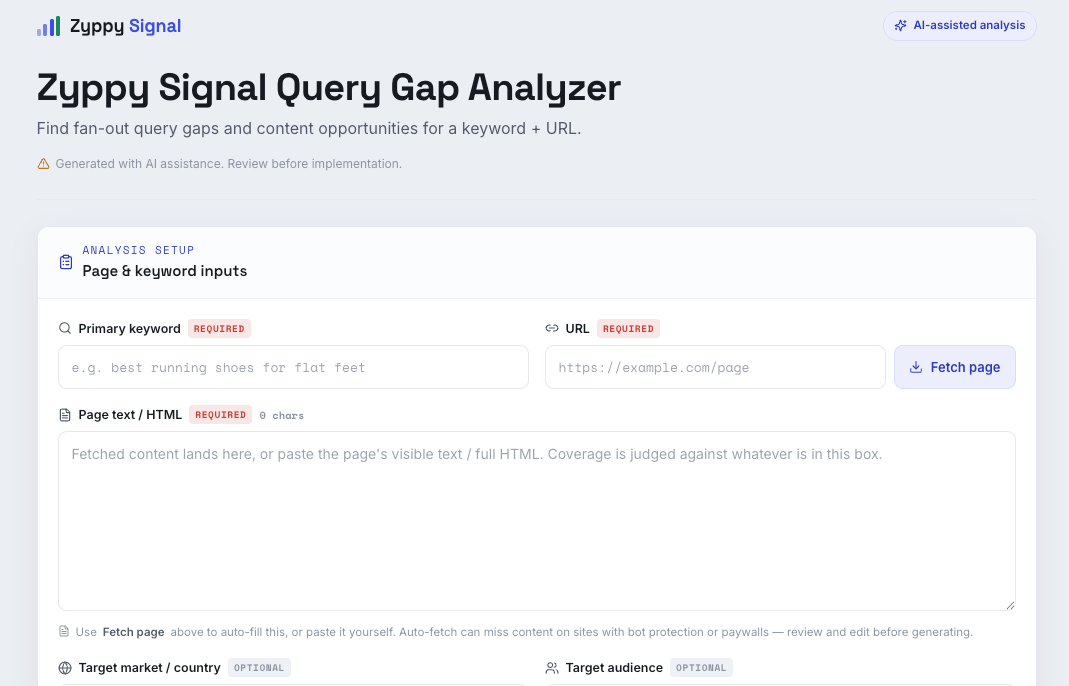
If you prefer Claude, this is very close in functionality to the ChatGPT tool, with a few differences.
Enter a keyword and URL. Claude doesn’t fetch pages as easily as ChatGPT does, so you may need to paste your page content manually.
It finds the fan-out queries that search engines may expect the page to answer.
It shows what the page covers, what’s weak, and what’s missing.
It recommends when to add to the page vs. when a topic deserves its own page.
It gives examples H2 heading and notes.
The goal: help your page better satisfy a broader set of fan-out queries around a keyword.
Frequently Asked Questions
Isn’t this just optimizing for related queries, with a different name?
Most things in AI optimization have echoes in traditional SEO. So the answer is always “kinda, sorta, with a twist.”
So while they are similar, they are not exactly the same. For example, AI answers tend to be far richer and include much more specific information, such as comparisons, problem/solution queries, and decision funnels. We’re also far less concerned with keyword volume compared to traditional SEO. Finally, we also use different surfaces for research and measurement.
They are certainly similar, but subtly different.
Is this process about appearing in the AI answer, or being cited by it?
Great question! Most of this process is about getting cited by the AI, but in reality, there’s a lot of overlap here with appearing in the AI answer as well. Different AI engines are constantly updating how they answer and format questions, too.
Getting recommended by AI is often more about what others say about you, but what you say about yourself counts too. In the end, the more places you appear in the surfaces AI uses as sources, the better your chance of appearing.
How can you influence AI answers faster than traditional search results?
We love this question! For one, they use different algorithms. Google uses FastSearch/RankEmbedBERT to populate AI Overviews, which use 70 days of user data rather than the 13 months used for traditional search results.
AI answers can also dig deeper into search results, so a recent update you made to a URL might influence an AI answer more quickly than trying to get that content to rank near the top of traditional results.
Is there a fourth frequently asked question about fan-out queries?
No. There are only three.
How do you optimize for AI fan-out queries? Join the conversation on LinkedIn.
👋 Subscribe free (it helps me produce research like this) and get tips + tactics on how to win more SEO and AI visibility.